App Payment
Product Overview
App Payment means that the Trusty Pay user selects goods and places orders in the merchant's App, and selects Trusty Pay at the payment stage. Then the Trusty Pay client will be pulled up from the merchant's App, and the system will automatically redirect back to the merchant's App after the user completes the payment in the Trusty Pay client.
App Payment is a payment product more inclined to online scenarios, and often used for online retailers, catering takeout, etc
API List
|
Feature List |
Description |
|---|---|
|
the merchant server first calls the [Unified Order API] to generate a prepayment order. Client App to initiate payment with the response field 'appUrl'. |
|
|
Inquire the Pay and Refund result. |
|
|
The Merchant can refund the Payer via this API. |
|
|
After completing payment/refund, the Trusty payment system will send the payment/refund result to the Merchant. |
Business Sequence Chart
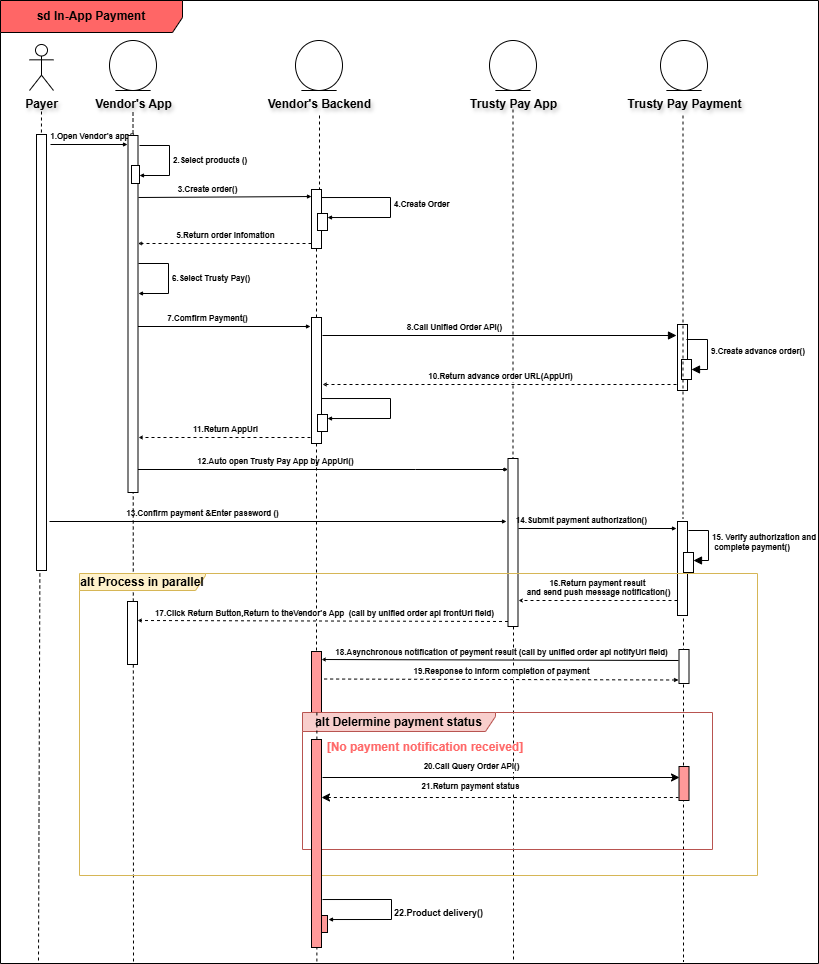
Service steps:
-
The user initiates a payment request in the Merchant App (e.g., by placing an order).
-
The Merchant App calls the Merchant backend order creation interface.
-
Merchant's backend calls the 【Unified Order API】 .
-
Trusty Payment system returns the unified order result (containing fields like TradeNo, appUrl, etc.)
-
Merchant's backend returns the unified order result to the Merchant App.
-
Merchant App redirects the user to the appUrl (Trusty Pay App).
-
Trusty Pay App calls the Trusty Payment system to validate the payment parameters and returns the payment interface to the user.
-
The user completes the payment operation within the Trusty Pay App (e.g., by entering a password or using fingerprint verification).
-
Trusty Payment system processes the payment request, performing operations such as deducting the payment amount.
-
Trusty Payment system sends an asynchronous payment result notification (callback) to the Merchant's backend.
-
Merchant's backend system receives the notification, verifies the signature, updates the order status, and returns a successful response to Trusty Payment system.
-
Trusty Payment system notifies the Trusty App of the payment result.
-
Trusty App displays the payment result and redirects back to the Merchant App.
-
The Merchant App calls the Merchant Server to query the order status (optional, to ensure consistency).
-
The Merchant Server returns the order status to the Merchant App.
-
The Merchant App displays the final order/payment result to the user.
Development Guidelines
Procedure: Submit a pre-order request for APP payment through this interface, obtain the tradeNo to call payment.
1. Merchant backend
JAVA :
@Test
public class callTrustyPayApi {

    //Trusty Pay App ID
    String appId = "gxIRTg7qHCSCAU15" ;
    //Merchant ID
    String mchntId = "1006";
    // Merchant Key
    String key = "Mc1GG7C3o5SEvdTUYgUuagXhgh1WfszR";
    // MD5 or HMACSHA256
    String signType = "MD5";


    // Get the random string
    String nonceStr = "20260101011232321231322";

    Map< String, String> unifiedOrderParams = new HashMap();
    unifiedOrderParams.put("app_id", appId);
    unifiedOrderParams.put("mchnt_id", mchntId);
    unifiedOrderParams.put("nonce_str", nonceStr);
    unifiedOrderParams.put("sign_type", signType);
    unifiedOrderParams.put("body", "Ipadmini16G white");
    unifiedOrderParams.put("detail", "");
    // Trusty Pay result notification URL. Check [Notification API]
    // The merchant notification URL must be accessible by external networks.
    unifiedOrderParams.put("notifyUrl", "https://www.merchant.backend.com/callback");
    // Return to the merchant APP payment order result page
    unifiedOrderParams.put("frontendUrl", "merchant-app://merchantxxx/pay-result.");
    unifiedOrderParams.put("tradeNo", "OD202601010000000001");
    unifiedOrderParams.put("timeExpire", "30");
    unifiedOrderParams.put("totalAmount", "10000");
    unifiedOrderParams.put("trnCcy", "MMK");
    unifiedOrderParams.put("tradeType", "APP");

    // 1. Sort parameter names in ascending alphabetical order based on their ASCII encoded names
    Set< String> keySet = unifiedOrderParams.keySet();
    String[] keyArray = keySet.toArray(new String[keySet.size()]);
    Arrays.sort(keyArray);

    // 2. Sort ASCII code of parameter names by lexicographical sequence based on the format of "key=value"
    StringBuilder sb = new StringBuilder();
    for (String k : keyArray) {
        // Empty parameter values are excluded in the signature;
        if (unifiedOrderParams.get(k).trim().length() > 0)
        {
            sb.append(k).append("=").append(unifiedOrderParams.get(k).trim()).append("&");
        }
    }
    // 3. Join API Key
    sb.append("key=").append(key);

    // System.out.println(sb.toString());
    //above: app_id=gxIRTg7qHCSCAU15&body=Ipadmini16G white&frontendUrl=your_app_scheme://your_app_host&mchnt_id=1006
       &nonce_str=20260101011232321231322
       ¬ifyUrl=https://www.merchant.backend.com/callback&sign_type=MD5&timeExpire=30&totalAmount=10000&
       &tradeNo=OD202601010000000001&tradeType=APP&trnCcy=MMK&key=Mc1GG7C3o5SEvdTUYgUuagXhgh1WfszR


    // 4. Signature with MD5 or HMACSHA256 ,and convert all result chars to upper case
    String sign = signature(sb.toString(), signType);

    // System.out.println(sign);
    // MD5 signature above: 31423A9CA4D6FD7DB467EC76521A3FE6

    // 5. Add signature to the request
    unifiedOrderParams.put("sign", sign);

    // 6. Send request
    String url = "http://xxxxx/openapi/v1/trusty/unifiedorder";
    HttpHeaders headers = new HttpHeaders();
    headers.setContentType(MediaType.APPLICATION_JSON);
    HttpEntity< Map< String, String>> httpEntity = new HttpEntity< >(unifiedOrderParams,headers);
    ResponseEntity< Map> responseEntity = restTemplate.exchange(url, HttpMethod.POST, httpEntity, Map.class);

    // 7. Process the response
    // ....
   // 8. return appUrl to open trusty pay app
}
2. Android Platform Implementations
2.1 Kotlin Implementation
val intent = Intent(Intent.ACTION_VIEW, Uri.parse(trustyapp_url))
intent.flags = Intent.FLAG_ACTIVITY_NEW_TASK or Intent.FLAG_ACTIVITY_CLEAR_TASK

if (intent.resolveActivity(context.packageManager) != null) {
    context.startActivity(intent)
} else {
    // No trusty app found
}
2.2 Java Implementation
Intent intent = new Intent(Intent.ACTION_VIEW, Uri.parse(trustyapp_url));
intent.setFlags(Intent.FLAG_ACTIVITY_NEW_TASK | Intent.FLAG_ACTIVITY_CLEAR_TASK);
if (intent.resolveActivity(context.getPackageManager()) != null) {
    context.startActivity(intent);
} else {
    // No trusty app found
}
3. iOS Platform Implementations
3.1 Add URL schemes to Info.plist under LSApplicationQueriesSchemes
<key>LSApplicationQueriesSchemes</key>
<array>
    <!-- for production environment -->
    <string>jl-app</string>
    <!-- for UAT environment -->
    <string>jl-app-uat</string>
</array>
3.2 Swift Implementation
UIApplication.shared.open(trustyapp_url, options: [:]) { success in
    if !success {
        // Failed to launch the trusty app
    }
}
3.3 Objective-C Implementation
[[UIApplication sharedApplication] openURL:trustyapp_url options:@{} completionHandler:^(BOOL success) {
    if (!success) {
      // Failed to launch the trusty app
    }
}];